
D. Business websites and CMS
Move a Static Business Website to a CMS: Migration Planning Checklist
Plan a static website to CMS migration with a page inventory, content models, URL decisions, redirects, editor access and post-launch checks.
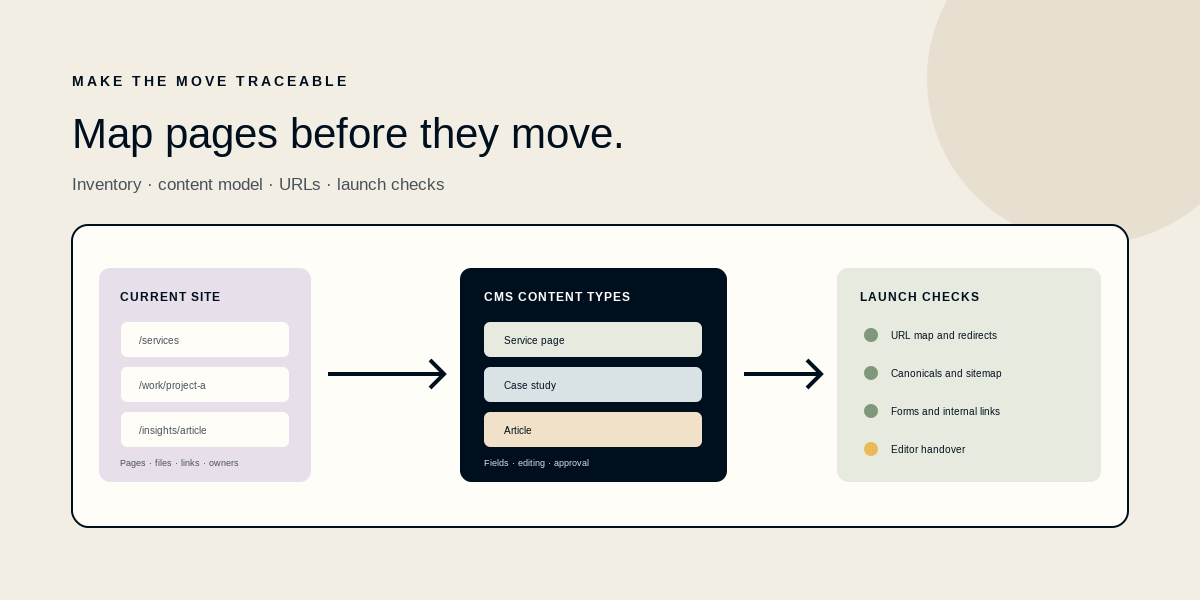
Moving a static business website to a CMS involves more than copying page text into a new editor. Inventory the pages and assets, decide what content should become structured and editable, preserve useful URLs where possible, and define who reviews and publishes changes. Test the new pages and any changed routes before launch so visitors and search engines can reach the right content afterward.
TL;DR
- Inventory current pages, URLs, media, forms and important internal links before migration.
- Model only content that the team needs to create or update through the CMS.
- Keep existing URLs when they remain suitable; map and redirect only routes that actually change.
- Test content, canonical URLs, links, forms, redirects and permissions on a staging site.
- Document the publishing workflow and the owner for post-launch checks.
Define what needs to improve before selecting a CMS
A CMS can make routine updates easier, but migration adds a new editing system, content model and maintenance responsibility. List the work that is difficult on the current static site: changing service details, publishing articles, updating case studies or managing approvals. Keep pages that rarely change in a simple workflow if they do not need frequent editing.
| Current problem | Decision to make |
|---|---|
| Simple copy edits require developer support | Which fields should the business edit directly? |
| New pages use inconsistent layouts | Which page types need shared templates and required fields? |
| Several people publish updates | Who can draft, review, approve and publish? |
| Images and documents are hard to find | How should media be named, grouped and described? |
| The site needs new integrations | Which integrations are necessary and who maintains them? |
For a broader explanation of when editing frequency justifies a CMS, see CMS website development for editable business content. For a platform decision, use the separate small business CMS workflow guide.
Inventory URLs, content and assets before rebuilding
Build an inventory from the current site, sitemap, analytics and Search Console data where available. Include pages that are not linked from the main menu, downloadable files, campaign landing pages and routes with useful organic or referral traffic. Record what should be retained, improved, merged or removed, along with an owner for each decision.
- List every current page URL and its page type.
- Record page title, main heading, meta description and important structured data where relevant.
- Collect images, PDFs, forms, embeds and other media that pages depend on.
- Identify internal links and backlinks pointing to important destinations.
- Mark duplicate, outdated, thin or legally sensitive content for review.
- Record redirect, indexing or canonical issues that already exist.
Do not use the migration as a reason to silently drop content or URLs that still serve a customer or search need. Make a documented decision for each important route before new templates are populated.
Choose content models that make editing safer and more consistent
A CMS page model defines which fields an editor sees and how those fields appear in the site. Use reusable page types for content that follows a meaningful pattern, such as service pages, case studies or articles. Make required information explicit, give editors guidance beside fields and avoid turning every paragraph into a separate custom field without a clear benefit.
| Page type | Fields to consider |
|---|---|
| Service page | Service name, audience, scope, process, proof, FAQs and enquiry action. |
| Case study | Project context, brief, delivered work, collaborators, permitted images and project facts. |
| Article | Title, summary, body, author, publication date, feature image and related service. |
| Location page | Actual service area, location details, local proof and a distinct contact route where useful. |
| Shared site content | Navigation, contact details, footer links and reusable call-to-action content. |
For examples of practical content patterns and editing effort, see CMS website examples for small businesses.
Keep URL changes intentional and map redirects where needed
If an existing URL is clear and still fits the page, keeping it avoids creating unnecessary redirects. When a route must change, map the old URL to the most relevant new page and plan a permanent redirect. Update internal links, canonical URLs and the sitemap to point to the chosen destination. A changed CMS does not by itself require every page URL to change.
- Choose the final route for every retained or consolidated page.
- Create a one-to-one old-to-new URL map for routes that will change.
- Use a relevant destination for each redirect and avoid sending unrelated pages to the homepage.
- Update internal navigation, contextual links, canonical tags and sitemap entries.
- Check response codes and redirect chains on staging or in a deployment preview.
- Keep a copy of the old URL map and monitor important routes after launch.
Google's site move guidance covers URL mapping, redirects, canonical updates, internal links and sitemap updates when URLs change. Apply the URL-move steps to the routes that actually move, not automatically to pages whose URLs stay the same.
Test the new CMS site before launch
Populate representative pages and test the editor workflow before migrating every record. Confirm that long titles, missing optional fields, mobile images and unusual page sections render safely. Editors should preview a draft and understand what will be published before it becomes public.
| Area | Acceptance question |
|---|---|
| Content | Are approved copy, images, credits and calls to action present? |
| URLs | Do unchanged routes resolve and changed routes redirect to the mapped destination? |
| Search metadata | Do page titles, descriptions, canonical URLs and index rules match the migration plan? |
| Links and forms | Do navigation, service links, enquiry forms and downloads work? |
| Mobile and accessibility | Can customers read the pages and complete key tasks on phones and with a keyboard? |
| CMS permissions | Can editors perform their role without access to settings they do not need? |
Define who signs off the pages and who responds to issues after launch. For a compact role design, see CMS editor roles and content approval workflows.
Monitor routes, indexing and editor questions after launch
After launch, check priority URLs, redirects, forms and the publishing workflow on the live site. Review Search Console coverage and sitemap processing when those tools are available, and monitor analytics for missing destinations or broken journeys. Search systems may take time to recrawl changed routes; distinguish implementation errors from normal processing time.
- Crawl a sample of old and new URLs and confirm the planned response.
- Check that important pages are internally linked and included in the current sitemap.
- Review Search Console and analytics for unexpected 404s, redirect chains or traffic drops.
- Ask editors to make a small approved update and verify the preview-to-publish process.
- Record remaining migration issues, owners and follow-up dates.
Peak Web Craft's business website development service can include CMS implementation when editing needs are part of the agreed scope.
Frequently asked questions
How do I move a static website to a CMS?
Inventory the current pages, URLs and assets; define reusable content types; choose what the team needs to edit; preserve suitable URLs; map redirects for changed routes; migrate and review content; then test the site and editor workflow before launch.
Will moving to a CMS change my website URLs?
Not necessarily. Keep existing URLs when they remain suitable. If a route changes, map it to a relevant destination, redirect the old URL and update internal links, canonicals and sitemap entries.
Should every page be editable in the CMS?
No. Make content editable when the team needs to update it and the editing interface can do so safely. Stable, rarely changed parts may remain controlled by the development team.
What should be tested before a CMS migration launch?
Check content, URLs, redirects, metadata, navigation, forms, media, mobile layouts, accessibility and editor permissions on representative pages before launch.
Can a CMS migration affect search traffic?
It can if important content, URLs, internal links, metadata or indexing behavior changes. Inventory pages, preserve appropriate URLs and monitor redirects and search data after launch; no migration plan can guarantee a traffic outcome.