
D. Business websites and CMS
CMS Editor Roles and Content Approval Workflows for Business Websites
Plan CMS editor roles and a practical content approval workflow for drafts, reviews, publishing access and ongoing website updates.
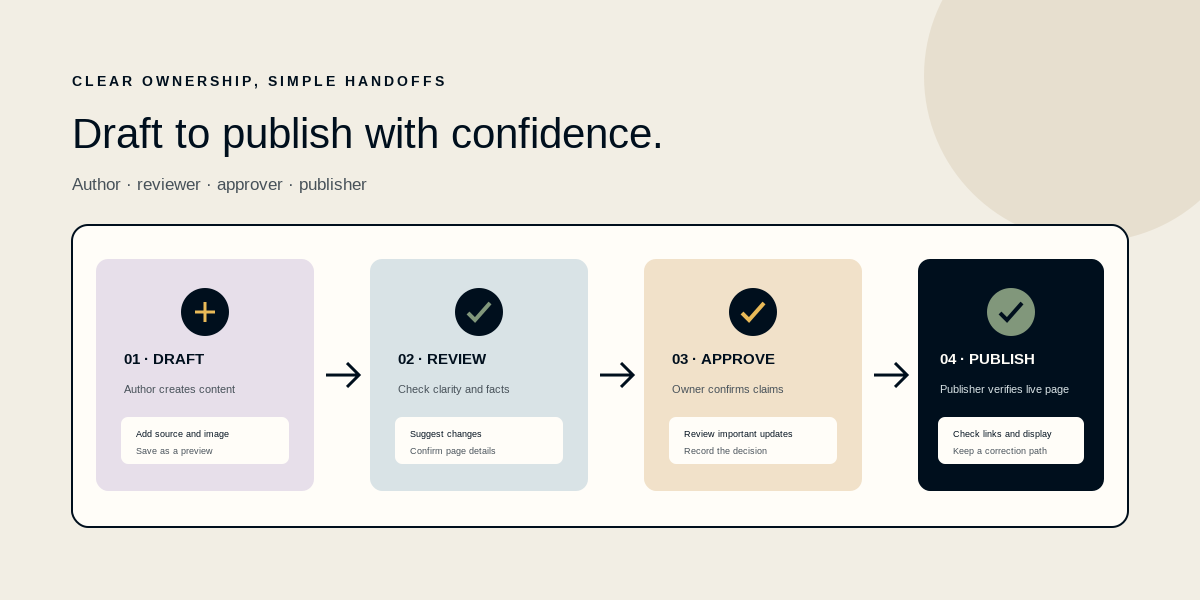
CMS editor roles define who can create, change, review and publish website content. A useful approval workflow gives each update a clear owner and enough review for the risk of that content, without forcing every small edit through a slow process. Start with the team's actual responsibilities, then configure only the permissions and publishing steps supported by the CMS.
TL;DR
- Separate content tasks from broad site administration where the CMS allows it.
- Assign named owners for drafting, review and publication, with backup coverage.
- Scale approval effort to the change: a typo fix does not always need the same review as a service or policy change.
- Check what the selected CMS can actually enforce before promising a particular workflow.
- Review accounts and permissions when staff or publishing responsibilities change.
Map the content work before creating CMS roles
Write down the tasks the team performs: draft a new service page, update an article, review a claim, publish a case study or change a navigation link. Then identify who is responsible for each task and which changes need a second pair of eyes. Roles should reflect these responsibilities, not simply reproduce job titles from an organization chart.
| Task | Typical owner question |
|---|---|
| Draft | Who creates or updates the initial content? |
| Review | Who checks accuracy, tone, links and page context? |
| Approve | Who is accountable for the claims, service scope or policy? |
| Publish | Who makes the reviewed change public and verifies it? |
| Maintain | Who revisits older content and removes outdated information? |
For a small business, one person may hold more than one role. The important point is that ownership is explicit, high-impact claims have an appropriate reviewer and nobody needs broad administrative access just to make a routine copy edit.
Use a small role set with clear permission boundaries
A role matrix helps the team agree what each person may do before configuring the CMS. The names below are generic examples, not a promise that every CMS offers these exact roles. Some systems combine draft, review and publishing permissions; use a manual handoff if the platform cannot enforce the full process.
| Role | Useful access | Keep outside the role unless needed |
|---|---|---|
| Author | Create and edit assigned content; preview drafts. | Site settings, user administration and publishing if a review is required. |
| Reviewer | Read drafts, suggest changes and confirm content accuracy. | Theme code, account management and unrelated content removal. |
| Publisher | Publish approved updates and verify the public page. | Broad system configuration or access to unrelated business systems. |
| Site administrator | Manage platform settings, integrations and user access. | Routine content work that can use a narrower content role. |
OWASP's authorization guidance recommends granting only the privileges needed for a user's work and reviewing permissions as responsibilities change. Apply that principle to CMS access while checking the capabilities and security model of the actual platform.
Choose a review flow that matches the content risk
Not every page update needs the same sequence. A typo correction can have a quick review, while a new service promise, pricing statement, client claim or policy change may need approval from a specific owner. Define the steps for common content types and make exceptions clear so urgent fixes do not wait for an unrelated approver.
- Author creates the draft and marks any facts or images that need confirmation.
- Reviewer checks clarity, accuracy, links, permissions and page-specific details.
- Approver confirms high-impact claims or changes within their responsibility.
- Publisher previews the final page and publishes at the agreed time.
- A second person verifies the live page, links, forms and metadata where the change warrants it.
- Owner records follow-up work or a review date for time-sensitive content.
If the CMS cannot enforce draft states, approvals or scheduled publishing, document the handoff outside the system and make the final publisher explicit. Avoid buying or building a complex workflow until the team has demonstrated that it needs one.
Make previews and review instructions specific
A review request should say what changed, why it changed and what the reviewer should verify. The editor should be able to preview the page with real content, not just inspect a field list. Check how the update appears on mobile and whether optional content leaves awkward empty sections.
- Name the page and the intended publication date or urgency.
- Summarize the requested change and link to the source or approval evidence.
- Call out claims, prices, service boundaries, image rights or legal text that need review.
- Ask the reviewer to check links, page title, mobile display and the next customer action.
- Record who approved the change and who made it live when the platform supports history.
- Keep a rollback or correction path for a published mistake.
If a site is moving into a CMS, define the editor and approval process alongside the content model. The static website migration checklist includes permissions in its launch review.
Review accounts, permissions and ownership over time
The workflow needs an owner after launch. Review who has access when a staff member changes responsibilities or leaves, remove unused accounts, confirm recovery contacts and ensure the business knows how to request a role change. Use individual accounts rather than sharing one login so actions can be attributed and access can be adjusted for one person.
| Event | Action |
|---|---|
| New editor joins | Grant the narrowest role needed and explain the publishing workflow. |
| Staff responsibility changes | Update role access and confirm who owns pending drafts. |
| Staff member leaves | Disable the account and reassign their content responsibilities. |
| New integration is added | Review which users and services can access connected data or settings. |
| Quarterly or scheduled review | Confirm every named account still needs its current permissions. |
Platform features such as audit history, multi-factor authentication and approval controls differ. Check them in the selected CMS and document the business's chosen process instead of assuming they are enabled by default.
Test the workflow with a real update before handover
Ask an editor to complete a representative content change using the role they will have after launch. Confirm they can find the right page, update fields, preview the change, request review and understand what happens after approval. This walk-through often reveals confusing field names, missing instructions and unnecessary permission requests.
- Create a draft using a representative page type.
- Submit it for review with context and source information.
- Return a realistic correction and observe how the editor resolves it.
- Publish or schedule the approved change using the designated role.
- Check the live page and confirm the editor knows how to correct or roll back an error.
- Write down role ownership and the point of contact for access changes.
For the underlying page patterns that editors maintain, see CMS website examples for small businesses. Peak Web Craft's business website development service can include an agreed CMS handover and editing workflow.
Frequently asked questions
What CMS roles does a small business website need?
A small team may need an author, reviewer, publisher and administrator, with one person holding multiple roles. Define responsibilities first and use only the roles and permissions the selected CMS supports.
Should every CMS editor be allowed to publish?
Not necessarily. If content needs review, separate drafting from publishing where the CMS allows it. A manual approval handoff can work when the platform does not offer distinct roles.
How many approval steps should website content have?
Use the fewest steps that protect accuracy and ownership. Routine copy edits may need a quick review, while changes to service promises, prices or policies may require a named approver.
Can a CMS enforce a content approval workflow?
Some CMS platforms support drafts, roles, scheduled publishing or approval states, while others provide fewer controls. Check the chosen platform and document a manual process for any steps it cannot enforce.
How often should CMS permissions be reviewed?
Review access when a person's role changes or they leave, when the CMS or integrations change, and on a regular schedule set by the business. Remove accounts and permissions that are no longer needed.