
C. Shopify and ecommerce
Shopify Product Page Design for Variant-Rich Catalogues
Plan Shopify product page design for variant-rich catalogues with clear option names, selected values, matching media, availability and purchase details.
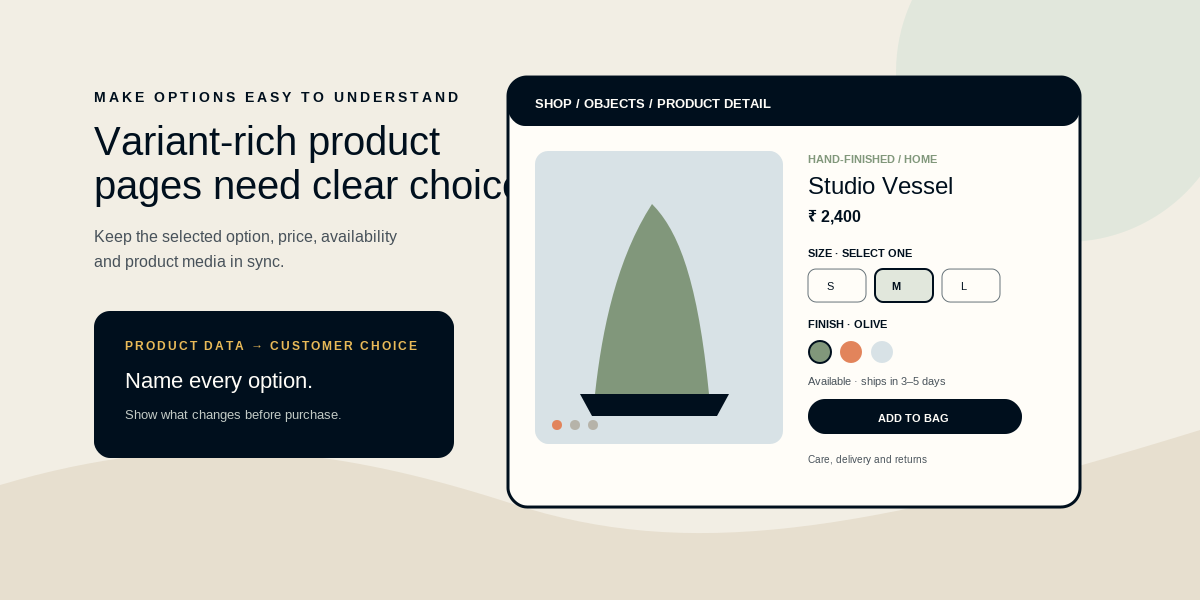
A Shopify product page for a variant-rich catalogue should make each option understandable before a shopper adds the item to a cart. Use descriptive option names, show the selected values clearly, keep price, availability and media aligned with the chosen variant, and explain fit, delivery or care details that affect the buying decision.
TL;DR
- Model the actual product options and valid combinations before designing their controls.
- Make selected size, colour, material or configuration visible and accessible.
- Keep variant-specific price, availability and media accurate as a choice changes.
- Test unavailable, sold-out and invalid combinations on the storefront and in merchant workflows.
Start with the product and variant data
Shopify describes a variant as a particular combination of product option values—for example, one size and colour combination. Each product option should have a customer-understandable name, and variant combinations may carry their own pricing, inventory and media. See Shopify's current variant documentation for platform details that can change over time.
| Data | Questions to answer |
|---|---|
| Option names | Will customers understand the labels without internal SKU language? |
| Values | Which sizes, colors, materials or configurations can actually be selected? |
| Combinations | Are all option combinations valid, or are some unavailable? |
| Price and inventory | Does a specific variant change price, stock or fulfillment information? |
| Media | Does selecting an option need to change the primary image or other details? |
Make the option selector clear and accessible
A shopper should be able to tell which option is selected, which options remain available and what action will change the selection. Text labels can help name a swatch whose colour alone might be ambiguous. Size controls should make the selected size obvious and provide a nearby link to a useful sizing guide when one exists.
- Use customer-facing option names such as Size, Colour or Material when they fit the product.
- Indicate the selected value with more than a subtle colour difference where practical.
- Explain unavailable values; do not make an invalid combination appear purchasable.
- Ensure keyboard focus and screen-reader labels identify each option and its state.
- Keep option controls close to the related price, stock or fit information.
Do not encode a complex configuration in a long row of tiny buttons. If options change other requirements, such as engraving or made-to-order details, decide whether the page needs a staged configuration flow or a separate enquiry route.
Keep price, media and availability in sync
When a shopper changes a variant, check whether the displayed price, availability, image, SKU-dependent details, delivery estimate or purchase action should also change. A selector that updates visually but leaves an old price or stock message in place can create a confusing or inaccurate order expectation.
| Selection state | Expected page behaviour |
|---|---|
| Available | Show the selected values, relevant price and a clear purchase action. |
| Sold out | State that the combination is unavailable and explain any notification or alternate choice. |
| Invalid combination | Prevent selection or explain which option value must change. |
| Different media | Show an image that accurately represents the selected colour or configuration. |
| Different fulfilment | Update or clarify delivery information if the variant changes how it is fulfilled. |
Give shoppers the details that help them judge fit
A product page should explain more than the available options. Depending on the product, include accurate materials, dimensions, fit, care, compatibility, contents, lead time or return information. Use distinctive descriptions and useful media; a selector cannot compensate for missing product facts.
Shopify's product documentation covers titles, descriptions, media, pricing, inventory and variant-specific management. Use those fields according to your real catalogue, and keep customer-facing claims consistent with the business's approved information. See Shopify product details.
This guide focuses on direct product selection. If an item needs a quote or consultation rather than immediate checkout, see how to handle Shopify price-on-request products for that distinct buying route.
Design the merchant editing workflow with the page
A product page is only as accurate as its underlying product data. Decide who maintains option names, values, inventory, variant images and descriptions. Use consistent conventions across similar products so staff do not need to interpret a different data structure for each item.
- Choose a representative product set to configure and review before bulk entry.
- Document how new variants, images, prices and availability are added or changed.
- Check whether existing theme sections support the required fields before adding a custom dependency.
- Clarify which information staff can edit and which changes need development.
- Record the review process for new products so page content stays accurate after launch.
Test variant combinations on the live storefront
- Select every type of option the product uses, including a representative combination for each state.
- Confirm the selected value, price, inventory and media remain aligned.
- Test sold-out and unpublished variants and any option that should be unavailable.
- Use keyboard and touch input to choose options and add a valid product to cart.
- Confirm the cart and checkout retain the selected combination and expected price.
- Ask the merchant team to update a product and verify its storefront display after handover.
For general storefront layout patterns, see ecommerce website design examples for Indian brands. For a complete store scope including merchant operations, see ecommerce development scope and handover.
Frequently asked questions
What should a Shopify product page include?
Include a clear product name, useful media, distinctive details, price, selectable options, availability and a purchase action. Add fit, care, delivery or return information that helps customers decide whether the product suits them.
How should Shopify product variants be displayed?
Use clear option names and values, make the selected values visible, and keep relevant price, availability and media consistent with the selection. Explain unavailable variants and test each important state.
Should size and color choices use dropdowns or buttons?
Choose controls based on the number and meaning of options. A small set of sizes or colours may work as clearly labelled buttons; a long list can benefit from a select control. In either case, make selected and unavailable states clear and keyboard accessible.
Can Shopify product variants have different prices or inventory?
Shopify supports variant-level pricing and inventory management. Confirm the current platform behaviour and your theme's display for the product configuration you use.
How should a Shopify page handle a product that is out of stock?
State that the selected variant is unavailable and provide an accurate next step, such as choosing an available option or using a notification feature if the store supports one. Do not leave an active purchase action that suggests the unavailable item can be ordered.