
Portfolio Websites
How to Build a Photography Portfolio Website That Brings in Client Enquiries
Plan a photography portfolio website that presents selected work clearly, loads well on mobile and helps prospective clients make a relevant enquiry.

A photography portfolio should help a client judge fit and start a conversation
A photography portfolio website is a curated presentation of work, not simply a folder of images online. A prospective client should be able to find the relevant kind of photography, understand the context of selected projects and see how to discuss a commission. The strongest structure depends on the photographer’s audience: weddings, commercial work, portraits, products, events and editorial projects raise different questions.
Before choosing a gallery style, list the clients you want to reach and the work they need to assess. A portfolio can show range without mixing every genre into one undifferentiated grid.
Curate by the way clients choose your work
- Select projects that demonstrate the style and type of commission you want.
- Group work into clear categories when different clients need different examples.
- Add a short project note with location or brief, your role and relevant constraints where appropriate.
- Remove duplicates and images that weaken the overall sequence.
- Confirm that you have permission to publish client, event or commissioned images.
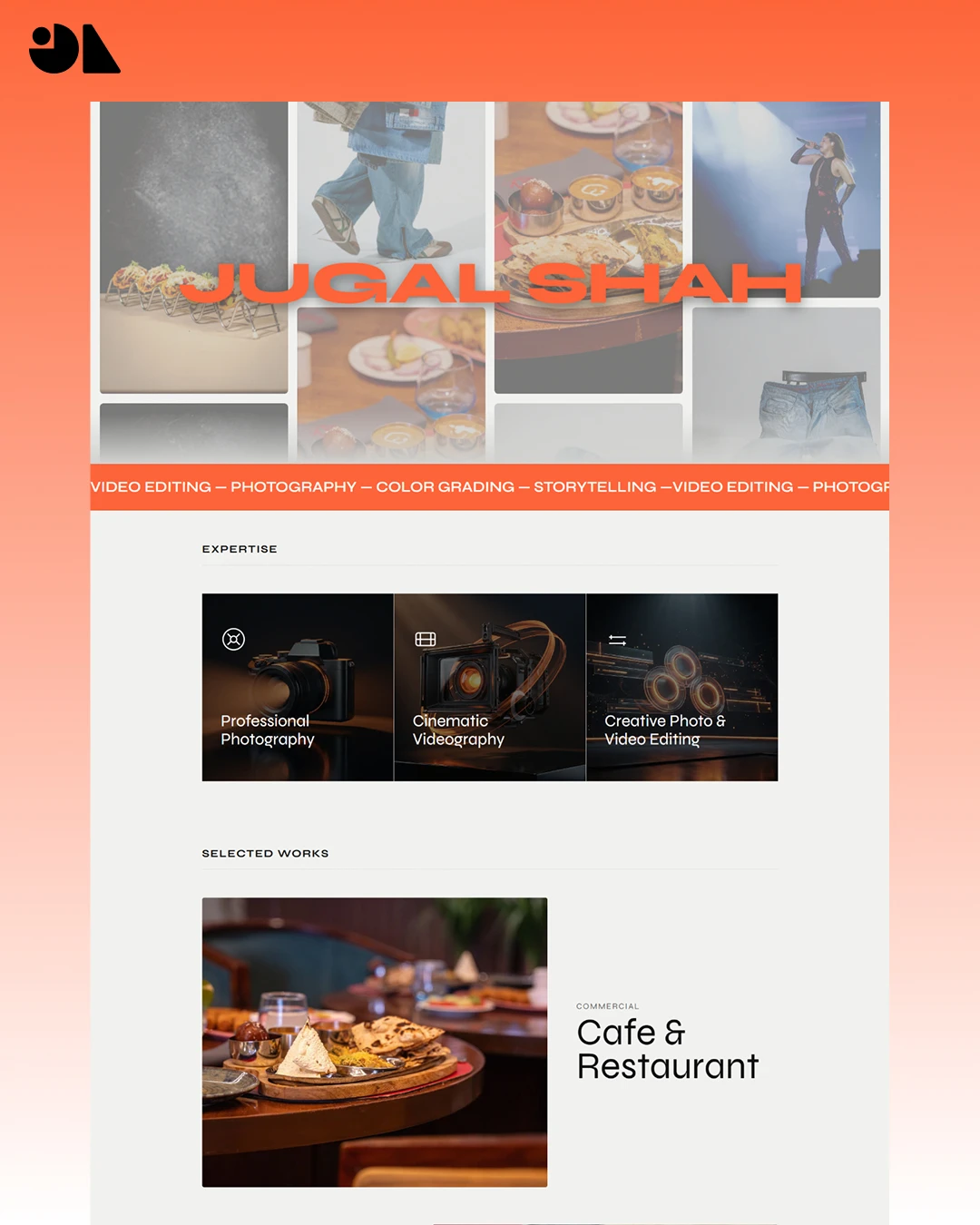
An image gallery is more persuasive when a visitor knows why the images belong together. A short introduction can explain the assignment or approach without competing with the photography. For a related example, the Jugal Shah portfolio case study describes a photography and videography portfolio with galleries and project pages.
Build a structure that supports browsing and enquiries
| Page or section | Purpose |
|---|---|
| Home | Show the photographic focus and route visitors to relevant work |
| Portfolio categories | Let clients browse a defined genre or service |
| Project pages | Present selected sequences with context and credits |
| About | Explain the photographer’s approach, location or working style |
| Services or process | Clarify what can be commissioned and how a project proceeds |
| Contact | Collect the project details needed for a useful reply |
A one-page portfolio can work for a focused practice. Add separate project or service pages when they answer distinct client questions, not simply to increase page count. Our guide to portfolio versus business websites can help decide how broad the site should be.
Keep images expressive without making the site hard to use
- Export image sizes suitable for the space where they appear.
- Keep intrinsic dimensions or layout space to reduce content shifts while images load.
- Use a responsive layout and check image crops on mobile.
- Add alternative text that describes informative images; use empty alt text for decorative images.
- Make gallery controls operable by keyboard and provide clear labels.
- Test page speed on a representative mobile connection and reduce unnecessary large assets.
A photographer may need detailed images to show craft, but the page should remain responsive for people on slower connections. Let the site reveal work progressively and avoid autoplay that takes control away from the visitor.
Make the enquiry route specific enough to start the right conversation
Ask for the details that help assess fit, such as the photography type, date or location when relevant, expected usage and a way to reply. Do not require a long form when a concise message is enough. Tell visitors what happens after submission and test the notification that reaches the photographer.
If you accept bookings or deposits, explain how availability and confirmation work. A contact form is not a confirmed booking, and the site should not imply otherwise. Measure completed enquiries separately from gallery views or button clicks.
The Jugal Shah case study documents galleries, a custom image viewer and responsive development. The useful decision to carry into your own brief is how a client moves from a selected category to a complete project and then an enquiry. Do not assume that a gallery style alone changes the number of commissions.
If you are preparing a build, our photography website design page explains the content inputs, example work and scope to discuss.
Questions about photography portfolio websites
How many photos should a photography portfolio show?
Show enough work to demonstrate the genres and quality you want to be hired for. A focused selection with context is easier to assess than a large archive with repeated images.
Should I use one gallery for every photography style?
Separate categories when clients have different needs or when the work would be difficult to understand together. Keep navigation simple and avoid categories that contain too little relevant work.
Does a photography portfolio need an online store?
Only if people can buy defined products, prints or downloads through a reliable fulfilment process. Many photographers begin with a portfolio and enquiry route, then add commerce when the product and operating model are clear.
What should a client enquiry form ask?
Ask for the minimum details needed to understand the project and respond. The fields depend on the type of work; let visitors know which details are optional and what happens next.
Can a portfolio website help with search?
It can help people discover and understand your work when pages are accessible and useful, but search inclusion and rankings are not guaranteed. Give projects meaningful context and connect them to relevant service information.