
C. Shopify and ecommerce
Ecommerce Site Search UX: Queries, Suggestions, and No-Result States
Improve ecommerce site search UX with clear query entry, useful suggestions, relevant results, filters and recovery paths when a search finds no products.
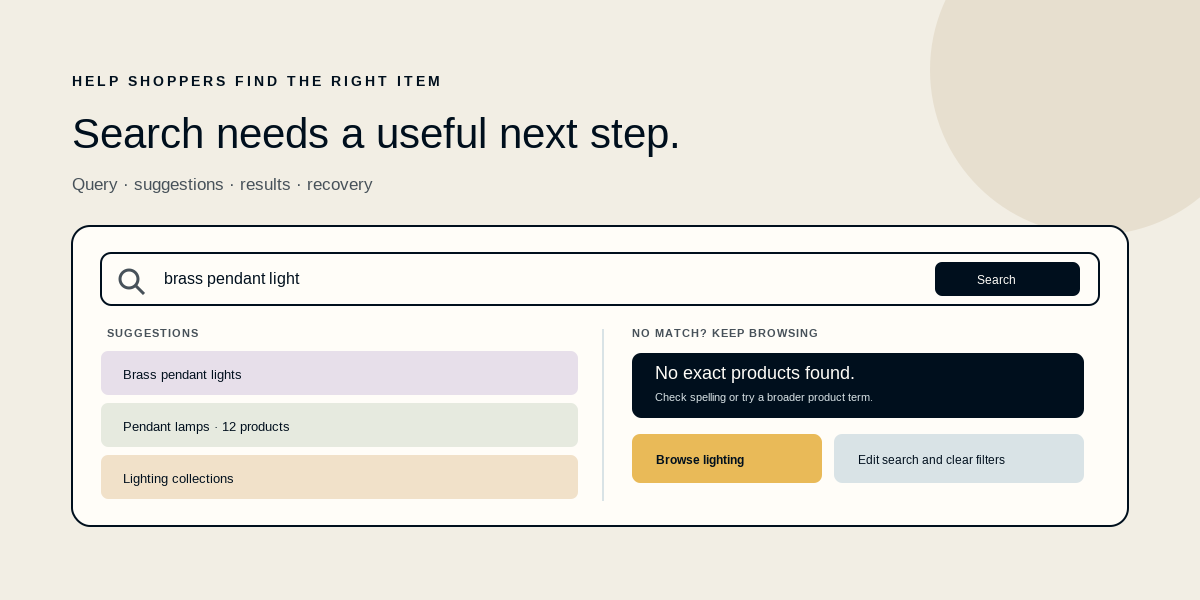
Ecommerce site search UX includes the search field, query suggestions, result ranking, filters and the recovery path when nothing matches. The objective is to help a shopper express a product need, understand the results and continue browsing if the first query fails. A search box that submits correctly can still frustrate customers when suggestions are vague, results ignore product data or a no-result page offers no next step.
TL;DR
- Make search easy to find, label and use with a keyboard or touch screen.
- Use suggestions to clarify product terms and route people to relevant destinations.
- Show product attributes that help shoppers judge search results before opening each item.
- Turn empty results into useful recovery options, not a dead end.
- Review real query and zero-result data before changing synonyms or ranking rules.
Treat site search as a product-finding path
Search supports a different starting point from category browsing: the shopper already has words, a product type, a brand or a feature in mind. Decide whether the search needs to cover products only or also store information such as shipping, returns and sizing. Then define what a useful result looks like for the most common types of query in your catalogue.
| Query pattern | Search experience to consider |
|---|---|
| Product type | Show matching products with the attributes shoppers use to compare that type. |
| Brand or collection | Offer a relevant destination or a clearly scoped product result. |
| Feature or use | Use reliable product attributes or curated synonyms to find relevant options. |
| Specific model or SKU | Support exact matches and keep the product identity visible. |
| Store information | Link to relevant policies or help content if the search covers non-product pages. |
| Typo or no match | Offer a correction or broader route without silently changing the meaning of the query. |
Baymard's ecommerce search UX research covers search fields, autocomplete, results and no-result pages. Its published query-type guidance is a useful prompt for testing more than exact product-name searches.
Make the search field and suggestions easy to understand
Place a clearly named search control where shoppers expect to find it, including on narrow screens. Suggestions should appear soon enough to help but should not block typing, hide the query or make the rest of the page unusable. Each suggestion needs a clear action and enough context to distinguish a product, category or query completion.
- Provide a visible label or accessible name for the search field and a clear submit action.
- Keep the entered query editable when a suggestions panel opens.
- Group suggestions by meaning only when the groups help shoppers choose a route.
- Make suggestions operable by keyboard and touch, with a visible active state.
- Avoid showing a long list of nearly identical completions that adds noise.
- Let shoppers close suggestions and return to the results or page content predictably.
Autocomplete is part of the selection interface, not a substitute for a useful results page. Test whether suggestion text accurately reflects available products and whether the selected suggestion leads to the intended query or destination.
Give search results enough information to compare
Keep the submitted query visible so shoppers can refine it. Product results should expose the same decision-making information the catalogue supports, such as a clear name, price, image, relevant option or availability details. Use filters when the result set has meaningful attributes and make selected filters visible.
| Element | Implementation question |
|---|---|
| Query context | Can a shopper see what they searched for and edit or clear it? |
| Result count | Does the number match the products actually displayed? |
| Product details | Are important attributes visible without opening every product? |
| Filters and sorting | Do controls match this result set and communicate selected values? |
| Pagination or loading | Can people reach more results and understand when the list is complete? |
| Destination | Does each product result lead to a crawlable, working product page? |
For product-card decisions, see ecommerce product card design. For category navigation and facet choices, see ecommerce category page design.
Give no-result searches a relevant way forward
A zero-result state should explain what happened and offer a useful next action. Depending on the query and available data, the store might suggest checking spelling, removing a restrictive filter, browsing a nearby category or trying a broader term. Do not show unrelated products as if they match the request.
- Repeat or summarize the query so the shopper can confirm what was searched.
- Check whether active filters caused the empty result and make them easy to change.
- Offer a plausible spelling correction or synonym only when the result is relevant.
- Provide a path to a related category or a broader product type when one exists.
- Keep site help, contact or policy pages reachable if the query might be non-product information.
- Record recurring no-result terms so the merchant can investigate catalogue gaps or search rules.
Baymard's article on no-result page recovery explains why a blank dead end is difficult to recover from. Adapt the recovery options to products and categories the store actually carries.
Test search on mobile and with assistive input
On a phone, the search field, keyboard, suggestions and result list share limited screen space. Check that the query remains visible, suggestion rows are easy to select, focus is not lost when results update and the screen reader announces meaningful changes. A shopper should be able to dismiss suggestions, correct a query and use the results without needing a pointer.
- Submit using the on-screen keyboard and the visible search button.
- Move through suggestions and results with a keyboard and confirm focus is visible.
- Test a long query, an empty query, special characters and a typo.
- Check that result updates and zero-result messages are announced clearly.
- Verify that controls remain usable when text is enlarged and the viewport is narrow.
For a full cross-device path from discovery to checkout, use the mobile ecommerce design guide.
Use query data to improve the catalogue and search rules
Review search terms, refinements, exits and zero-result phrases where your analytics and privacy practices allow. Group queries by intent, then check product names, attributes, synonyms, stock status and category coverage before changing ranking. A query that returns no results may indicate a typo, a missing synonym, an inventory gap or a product that the store does not offer; those cases need different fixes.
| Signal | Possible next check |
|---|---|
| Repeated no-result phrase | Compare the query with catalogue names, customer language and supported synonyms. |
| Search refinements | Check whether users are narrowing by a missing or confusing attribute. |
| Search exits | Inspect result relevance, product availability and the next action on the page. |
| Searches followed by product views | Confirm the result matched the query and product detail information was clear. |
| Searches for store policies | Decide whether search should include useful non-product pages. |
Peak Web Craft's ecommerce website development service can scope catalogue search, connected product data, result states and merchant controls where they fit the store's requirements.
Frequently asked questions
What makes ecommerce site search UX effective?
Effective store search is easy to find and use, returns relevant products for real query types, exposes useful comparison details and offers a relevant recovery path when no results match.
What should ecommerce search suggestions show?
Show concise, relevant query completions or destinations that help shoppers choose what to search or browse. Keep the entered query clear and make suggestions accessible by keyboard and touch.
How should an ecommerce site handle no search results?
State that there are no matches, retain the query and offer suitable next steps such as checking spelling, removing a filter, broadening the query or visiting a related category.
Should ecommerce site search include help and policy pages?
It can be useful when shoppers search for information such as shipping, returns or sizing. Decide whether the search should cover those pages and ensure product results are not confused with informational results.
How can a merchant decide which search synonyms to add?
Review actual customer query data and compare it with product names, category terms and reliable product attributes. Add synonyms when the terms mean the same thing for the catalogue, and test that they do not introduce unrelated results.