
Booking Websites
Class Booking Websites: Scheduling and Capacity for Fitness Studios
Plan a fitness class booking website around recurring schedules, session capacity, waitlists, instructor availability, member rules and cancellations.
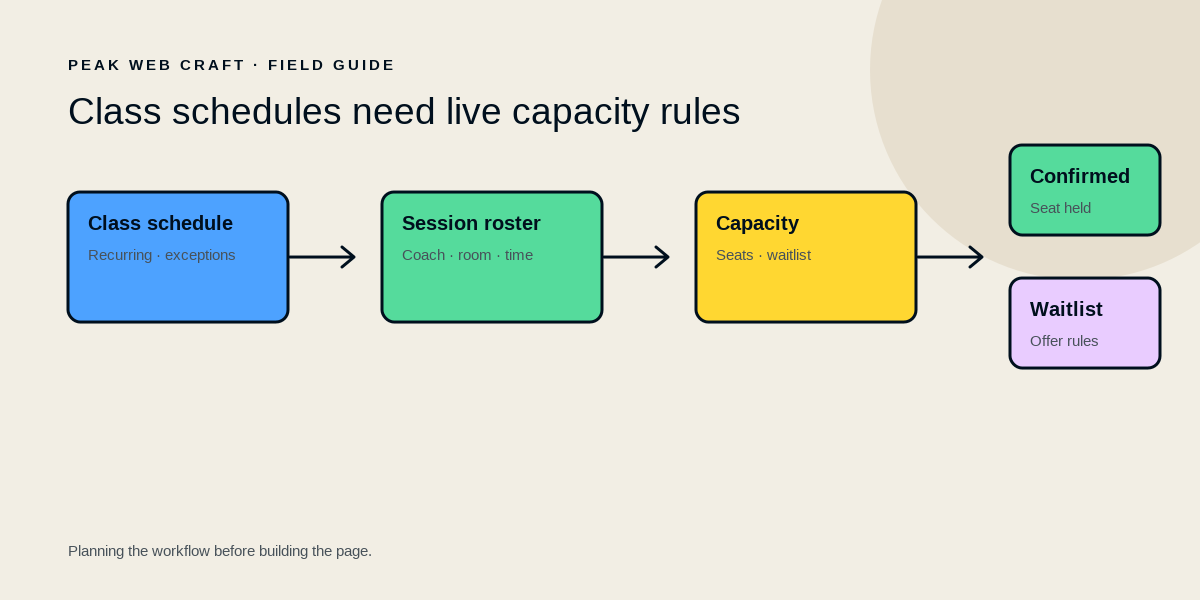
A fitness class booking website has to coordinate recurring schedules, limited places, instructors and the rules members follow when they book or cancel. A calendar that only displays times does not establish whether a class has room, whether a waitlist is active or whether a booking is confirmed. Define those operating rules first, then decide whether an existing scheduler or a custom booking flow can represent them reliably.
TL;DR
- Model classes as sessions with their own date, time, instructor, room and capacity.
- Decide how recurring schedules, exceptions, substitutions and cancellations are updated.
- Define waitlist order, offers, response windows and seat release rules.
- Make member eligibility, credits or payment and booking status clear before confirmation.
- Test simultaneous bookings, full classes, instructor changes and mobile access.
Treat each class occurrence as a bookable session
Class scheduling differs from a one-to-one appointment. A studio may offer the same class every week but still needs a separate capacity, instructor, room and booking state for each occurrence. A class series can have exceptions for holidays, special events, substitute instructors or a changed room.
| Record | Example decision |
|---|---|
| Class type | Name, level, duration and description. |
| Session occurrence | Date, start time, time zone, room or online format. |
| Capacity | Maximum confirmed places for this occurrence. |
| Instructor | Assigned coach and eligible substitute. |
| Booking window | When reservations open and close. |
| Eligibility | Whether a member, plan or payment is needed. |
Define who can create and edit occurrences. If the studio also accepts walk-ins, decide how a staff member records those places so the online capacity remains accurate.
Define recurring schedules and calendar exceptions
Before publishing a recurring timetable, decide how the next weeks or months are generated and who checks the schedule. A weekly rule needs an exception path: an instructor may be away, a class may be cancelled or a room may become unavailable. Avoid editing a long series in a way that silently changes existing bookings.
- Set the repeating pattern, date range and booking window.
- Decide how public holidays and studio closures affect the series.
- Specify how a coach substitution or room change is communicated.
- Choose whether changes apply to one session or future occurrences.
- Notify booked members when a material change affects their session.
- Review upcoming sessions and exceptions before the timetable is published.
The schedule should show the local time clearly and handle changes in the studio’s time zone. For studios with several locations or online classes, make the selected location or time zone visible before the member confirms.
Make capacity and waitlist rules understandable
Capacity must reflect actual places, not a number maintained separately from bookings. Decide how the system handles concurrent reservations, cancelled seats, staff blocks and attendance recorded outside the website. If a class is full, explain whether a waitlist is available and how a person can join it.
| Rule | Questions to settle |
|---|---|
| Order | Is the waitlist first-come-first-served or based on another published rule? |
| Offer window | How long does a person have to accept an available place? |
| Notification | Which channel sends the offer and what happens if delivery fails? |
| Seat release | When is an unaccepted place offered to the next person? |
| Multiple sessions | Can a member waitlist more than one class at the same time? |
| Staff override | Who can add or remove someone and how is the change recorded? |
A waitlist should not imply that a place is guaranteed. Describe how it works and make the booking status visible. Test two people trying to reserve the last place at the same time, and verify the system cannot confirm more seats than the session allows.
Show membership, payment and booking status before the final step
Members should know whether the class is included in a plan, uses a credit, requires payment or needs staff approval. Explain any deadline or cancellation rule before the final booking action. The confirmation should name the class and occurrence, show its current status and provide the permitted route to cancel or change the reservation.
- Let members check the class level, location and instructor before booking.
- Show whether a place is reserved, pending approval or waitlisted.
- Explain credit use, payment timing and any relevant refund rule.
- Make cancellation deadlines and late cancellation consequences visible.
- Provide a member route to review upcoming bookings and changes.
- Avoid asking for unrelated personal details during a class reservation.
If payments are part of the flow, verify the payment result and booking record together. A payment failure should not leave a misleading confirmed place, and a booking failure should not silently leave a member charged without a clear resolution path.
Give instructors and studio staff the views they need
The member-facing calendar is one side of the workflow. Instructors may need a roster and the relevant session changes; front-desk staff may need to check people in, record a walk-in or handle a cancellation; managers may need to adjust capacity or schedule substitutions. Keep those roles distinct and define who can view or change each booking.
| Role | Useful task | Access decision |
|---|---|---|
| Member | Book, cancel and review own sessions. | May view own bookings and eligible public sessions. |
| Instructor | Review assigned session roster and changes. | May view only sessions assigned under studio rules. |
| Front desk | Check in attendees and manage approved exceptions. | Can update allowed attendance or booking states. |
| Manager | Edit timetable, capacity and staff assignments. | Can change scheduling rules and review operational history. |
If a studio uses several staff members or rooms, see
Test full classes, changes and failure states before opening bookings
Test with staff and member accounts before directing customers to the schedule. Include a full class, last-place concurrency, cancellation, late cancellation, waitlist acceptance, instructor substitution, room change, payment failure and a notification that does not deliver. Check whether the schedule and roster agree after every change.
- Check the booking flow on a phone and with keyboard navigation.
- Confirm capacity after an online booking, a walk-in and a cancellation.
- Verify a full session cannot accept an extra confirmed seat.
- Test waitlist notifications and offer expiry with realistic timings.
- Check that staff changes reach affected members and instructor views.
- Review the connection between bookings, membership credits and payment records.
A scheduling platform may cover ordinary classes; a custom workflow may be needed when the studio has rules or integrations it cannot configure. Compare the options with scheduling embed versus custom booking system and review Peak Web Craft’s Booking Website Development service.
Frequently asked questions
What features does a fitness class booking website need?
At minimum, show class details and recurring sessions, available capacity, instructor and location, booking status, member eligibility, confirmation and cancellation rules. Add waitlist or payment features only when the studio’s process needs them.
How should a class booking website handle a full class?
Stop confirming seats at the agreed capacity. If the studio uses a waitlist, explain its order, notification, response window and how an unclaimed place is offered to the next person.
Can recurring fitness classes use a normal appointment calendar?
A basic calendar may work for simple schedules, but group classes also need per-session capacity, rosters, substitutions and waitlist rules. Check that the chosen tool supports those requirements.
Should members pay when they book a class?
That depends on the studio’s membership, credit and payment model. Make eligibility and payment timing clear before confirmation, and test how failed payments affect the reservation.
When does a fitness studio need a custom booking website?
Consider a custom scope when the studio’s capacity, member eligibility, instructor assignment, waitlist, payment or integration rules cannot be represented reliably in an existing scheduler.