
Landing Pages
Event Registration Landing Pages: Plan the Signup Flow
Plan an event registration landing page around clear event details, a short signup flow, capacity rules, confirmation and a useful follow-up.
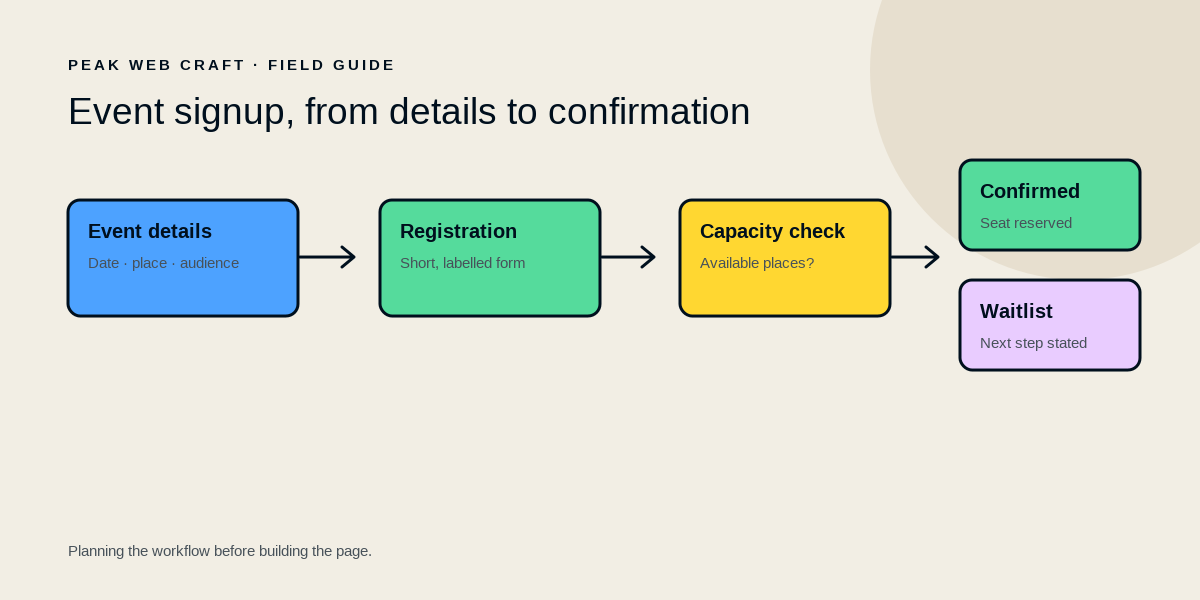
An event registration landing page should answer the questions a prospective attendee needs to decide, collect only the details the organizer needs, and show what happens after signup. Treat the page and the registration system as one journey: a polished event description cannot compensate for a form that loses submissions or leaves people unsure whether their place is confirmed.
TL;DR
- Put the event purpose, date, time zone, location or format, audience and cost near the signup decision.
- Ask only for information needed to register, deliver the event or meet a clearly explained operational requirement.
- Distinguish a received request, a confirmed place, a waitlist position and a completed payment.
- Make form labels, errors, confirmation and the next step understandable on mobile and with assistive technology.
- Use event structured data only when the page and event meet Google’s current eligibility rules; markup does not guarantee a search feature.
Give the event registration page one clear job
A dedicated event registration landing page gives a workshop, conference, open house or business session a focused place to explain the offer and accept signups. It is most useful when the event needs a distinct audience, message, schedule or registration path. If the page is only a general list of recurring classes, a schedule or booking experience may be the better starting point.
Write down what a successful registration means before choosing a layout. A person may request a place that an organizer later approves, or the system may immediately confirm a seat. Those are different outcomes and should use different language. Avoid displaying a “registered” state until the process has actually reserved or approved the place.
| Event setup | Likely page need |
|---|---|
| One event with a fixed date and signup | A focused event page with its own details and registration route. |
| Several upcoming events | An event listing that links to a distinct page for each event that has its own registration. |
| Recurring sessions with selectable times | A booking or class schedule where time, capacity and availability are central. |
| Request that requires organizer review | A request form with an explicit pending status and a stated response process. |
For a broader campaign-to-page checklist, see Google Ads landing page message match and enquiry tests.
Answer the practical questions before asking someone to register
Visitors need enough detail to judge whether the event fits their schedule and needs. Lead with the event name and its purpose, then make date, start and end time, time zone, venue or attendance format, audience, price and accessibility information easy to find. Include the organizer’s identity and a route for questions when these details affect the decision.
- Describe what attendees will do or learn without promising outcomes the event cannot guarantee.
- Show the full date and local time zone, including when an event spans multiple sessions.
- Explain whether the event is in person, hybrid or online, and how attendees will receive access details.
- State the price, included items, refund or cancellation terms and any eligibility limits.
- Identify the organizer and provide a real contact route for registration questions.
- Keep important information in page text rather than only inside a poster image.
Google’s Event structured data guidance calls for accurate event information on a page focused on a single event and lists specific eligibility rules. The event experience is not a general-purpose signup enhancement, and Google says correct markup does not guarantee a rich result. Review the current
Keep the registration form short and easy to complete
Every field adds effort and creates information the organizer must handle. Start with the minimum needed to identify the attendee, deliver event updates and operate the event. If an organization needs dietary, access or affiliation details, explain why they are requested and who uses them; do not collect sensitive information simply because the form builder makes it easy.
| Field | Include it when | Design check |
|---|---|---|
| Name | A named attendee record or badge is required. | Say whether each attendee needs a separate registration. |
| Confirmation or event updates will be sent by email. | Validate the address and show what it will be used for. | |
| Phone | There is a clear operational need for a phone contact. | Make optional status explicit if it is not required. |
| Organization or role | It changes eligibility, seating or event preparation. | Explain the reason and avoid broad data collection. |
| Access or dietary request | The organizer uses it to prepare an accommodation or meal. | Collect only relevant detail and restrict internal access. |
Use a visible label for each input, identify required fields in text, and make validation errors specific enough to correct. W3C’s form guidance explains why labels should remain programmatically associated with their controls; see the
Make capacity, confirmation and waitlist states explicit
A registration form and a capacity rule must agree. If the event has a limited number of places, decide which action reserves a seat, whether payment is required, how duplicate registrations are handled and what happens when the limit is reached. A success message should distinguish a submitted request from a confirmed place.
- Set the capacity source and decide who can change the limit.
- Choose whether valid registrations are confirmed automatically or reviewed by an organizer.
- Define how to handle a full event: close registration, accept a waitlist entry or offer another session.
- If someone cancels, decide whether the next eligible waitlisted person is contacted and for how long a place is held.
- Send a confirmation with event details, contact information and any next action.
- Test duplicate submissions, a full event, failed payment and organizer changes before launch.
For paid events, test the complete payment outcome and its relationship to the booking. A browser returning to a thank-you screen alone is not proof that payment settled or a seat was reserved. Keep a clear record of registration status so support staff can answer questions.
Test the whole journey on phones and assistive technology
Test a registration from the first page visit through confirmation using a phone-sized screen and a keyboard. Check focus order, field labels, error messages, date and time readability, and whether the confirmation is announced or plainly visible. Keep buttons descriptive, provide an alternative route for a failed submission, and do not make essential instructions dependent on color or an image.
- Open the page at narrow widths and enlarged text settings.
- Complete the form using keyboard navigation without a pointer.
- Trigger each validation message and verify that the correction is understandable.
- Test slow loading, a failed submission and a repeated click on the submit button.
- Check that the confirmation includes the event, status and contact route.
- Verify the page has a useful text alternative for informative images and a descriptive title.
A mobile preview is a useful first check, but it does not replace testing the actual registration provider, notifications and event operations. If the form is embedded, inspect its labels and errors in the embedded experience too.
Measure completed registrations and connect the page to the right service
Choose a small set of measurements that reflect the event process: page visits, completed registration attempts, confirmed seats, waitlist entries and attendance if it can be recorded reliably. Keep those outcomes separate. A click on the signup button is not the same as a completed registration, and a form submission may still be pending review.
Before publishing, check the final URL, page title and description, internal links, mobile layout, form delivery, confirmation and capacity behaviour. Add structured data only when it describes the visible event accurately and follows the current search documentation. Link the event page from relevant service or campaign pages and connect it to the landing page service when the reader needs a focused registration experience.
Peak Web Craft’s Landing Page Development service supports focused campaign, launch and registration pages with the agreed form or scheduling connection.
| Stage | Expected result |
|---|---|
| Visit | The event, date, format and audience are clear. |
| Signup | The required information is explained and can be entered accessibly. |
| Capacity | The user sees a confirmed, pending or waitlist state that matches the system. |
| Follow-up | The correct organizer receives the record and the attendee gets the agreed message. |
| Measurement | The business can distinguish an attempt from a confirmed registration. |
Frequently asked questions
What should an event registration landing page include?
Include the event purpose, date and time zone, location or format, audience, price and terms, organizer contact, registration form, capacity or approval state, and a clear confirmation or next step.
How many fields should an event signup form have?
Use the fewest fields needed to register and operate the event. Explain any optional or sensitive request and collect it only when the organizer has a defined use for it.
Should registration be automatic or approved?
Use automatic confirmation when the system can reliably reserve a place and apply the event rules. If staff must check eligibility or availability, call the submission a request and explain when the attendee should expect an answer.
Can Event schema make my page appear in Google event results?
Event structured data can make an eligible event page understandable to Google, but eligibility depends on the event and page meeting Google’s rules. Correct markup does not guarantee a special search display.
When should I use a booking website instead of a landing page?
Use a booking experience when visitors choose among recurring sessions or live availability and capacity is central. A landing page is useful for presenting one event and its focused signup path.